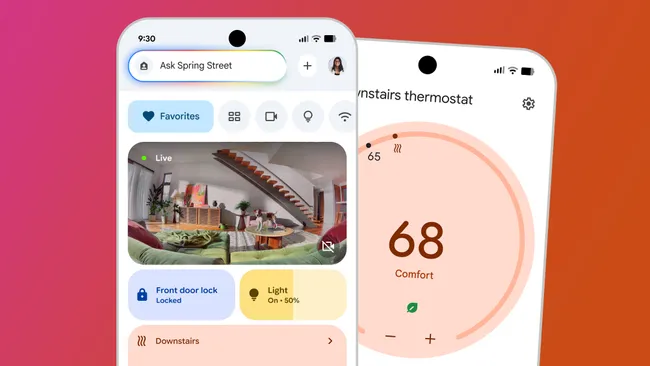
KEY TAKEAWAYS: – Google is replacing Assistant with Gemini AI on smart home devices – Compatible with speakers, displays, cameras, and doorbells from the past decade – Early access sign-up is now available in the Google Home app – Features more natural conversations and contextual understanding – Gemini Live requires a Google Home Premium subscription UPDATE OCTOBER 2: Initial access issues have been resolved by Google. The early access program is now widely available. See below for updated sign-up instructions. In a significant upgrade to its smart home ecosystem, Google is bringing its powerful Gemini AI to existing smart home devices, promising a more intuitive and conversational experience. The best part? You probably won’t need to upgrade your hardware to enjoy these new features. Google has announced that Gemini for Home will support an impressive range of legacy devices, including every speaker, smart display, camera, and doorbell manufactured over the last ten years. While the experience may vary slightly across different product lines, the backward compatibility is remarkably comprehensive. Out with the Old, In with Gemini Google isn’t holding back when describing the limitations of its predecessor. According to the company, interactions with the traditional Google Assistant were “functional, not intuitive or natural” and served as “a transactional tool, not a collaborative partner.” The new Gemini-powered experience aims to change that dynamic entirely. The upgrade introduces ten new voice options featuring improved pacing and natural intonation. More importantly, Gemini brings contextual awareness to smart home interactions, eliminating the need for robotic, step-by-step commands. What Makes Gemini Different? The transformation centers on making interactions feel more natural and less mechanical. Instead of breaking down requests into precise commands, users can now speak conversationally. For instance, rather than saying “Hey Google, add soy sauce to my shopping list, Hey Google, add noodles to my shopping list,” you can simply request “Hey Google, add ingredients for Pad Thai to my shopping list.” The AI understands the context and handles the details. Similarly, context-aware commands become possible. Saying “Hey Google, I’m about to cook, can you turn on the lights” will activate only your kitchen lights, not every bulb in the house. Gemini Live: The ChatGPT Alternative For users seeking an even more interactive experience, Gemini Live offers continuous conversation without repeatedly invoking the wake word. Simply say “Hey Google, let’s chat” to begin an open dialogue similar to ChatGPT’s conversational mode. There’s a catch, though: Gemini Live requires a Google Home Premium subscription to unlock this feature. Compatible Devices The following devices will receive Gemini for Home support: SPEAKERS: – Google Home (2016) – Google Home Mini (2017) – Google Home Max (2017) – Nest Mini (2019) – Nest Audio (2020) SMART DISPLAYS: – Google Nest Hub (1st gen, 2018) – Google Nest Hub Max (2019) – Google Nest Hub (2nd gen, 2021) CAMERAS & DOORBELLS: – Nest Cam (battery, 2021) – Nest Cam (indoor, wired, 2021) – Nest Cam with floodlight (2021) – Nest Doorbell (battery, 2021) – Nest Doorbell (wired, 2nd gen, 2023) Rollout Timeline Google has begun the early access phase this month, with cameras and doorbells receiving priority. Speakers and smart displays are expected to start rolling out near the end of October. As with any early access program, users should anticipate some rough edges. Google acknowledges this is a testing phase designed to gather feedback from early adopters while refining the experience. How to Get Early Access The early access sign-up is now available in the Google Home app. Here’s how to join the waitlist: 1. Open the Google Home app (version 4.0 or higher required) 2. Tap your profile icon in the upper-right corner 3. Select “Home Settings” from the menu 4. Scroll down to find and tap the “Early access” option 5. Follow the prompts to join the program Alternatively, you can access early access by tapping “Settings” in the bottom-right corner of the Home app, then scrolling to the “Nest services and support” section. Once you’ve registered, you’ll receive an in-app notification when Gemini for Home becomes available for your devices. What This Means for Smart Home Users This upgrade represents a significant shift in how we interact with smart home technology. By moving away from rigid command structures toward natural conversation, Google is addressing one of the most common frustrations with voice assistants. The extensive device support also demonstrates Google’s commitment to its existing user base, rather than forcing customers to purchase new hardware for basic AI improvements. Combined with the updated Google Home app launching alongside these features, the ecosystem is receiving its most substantial overhaul in years. For smart home enthusiasts, there’s plenty to be excited about. The Bottom Line Google’s integration of Gemini AI into its smart home ecosystem marks a meaningful evolution in voice assistant technology. While early access participants should expect some growing pains, the promise of more natural, contextually-aware interactions could finally deliver on the long-promised future of smart home control. If you’re invested in the Google Home ecosystem and have compatible devices, signing up for early access offers a risk-free opportunity to experience the future of home automation. Just remember to be patient as Google works through the inevitable bugs that come with any major platform transition.
Google’s Gemini AI Is Rolling Out to Smart Home Devices: How to Join the Waitlist